
 Post by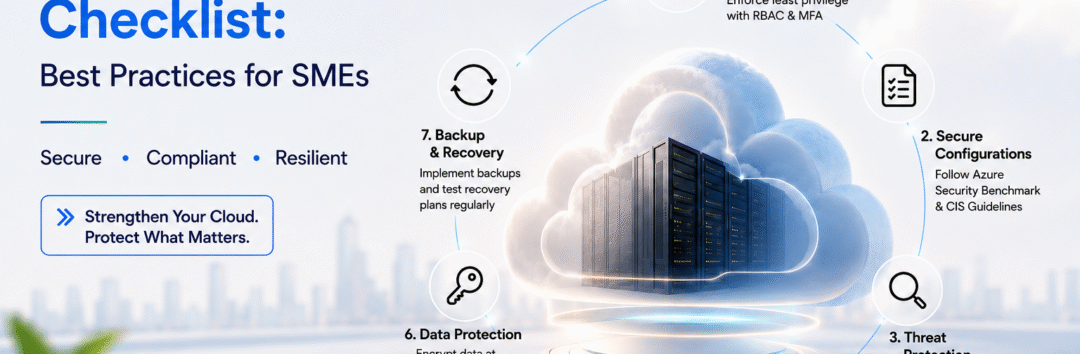
Introduction
As businesses expand their cloud services, the importance of hardening Azure environments becomes increasingly critical. Cloud computing provides numerous benefits, including scalability, flexibility, and cost efficiency; however, it also introduces security vulnerabilities that organizations must address proactively. It is essential for small to medium-sized enterprises (SMEs) to implement a comprehensive cloud security hardening checklist for Azure workloads to safeguard their sensitive data and maintain customer trust.
Transitioning to the cloud can present security challenges, but organizations should not approach these risks with trepidation. Instead, by adopting a strategic mindset and understanding the necessary security measures, businesses can significantly diminish their exposure to threats. A well-structured hardening checklist serves as a vital tool for ensuring that Azure environments are fortified against potential attacks, thus helping to protect critical assets and sensitive information.
Moreover, the evolving regulatory landscape mandates businesses to comply with various data protection laws. Adhering to a cloud security hardening checklist not only enhances security posture but also assists organizations in achieving compliance with these regulations. This dual approach facilitates the management of risk while aligning with legal requirements that govern data privacy and security.
Ultimately, the integration of best practices for hardening Azure environments allows SMEs to operate confidently in the cloud. By prioritizing cloud security measures, organizations can create a resilient framework that not only mitigates risk but also fosters a culture of security awareness among employees. It is imperative to recognize that these precautionary steps are essential components in fortifying Azure workloads and ensuring long-term success in cloud adoption.
Why Cloud Security Hardening Matters for Azure Environments
The concept of cloud security hardening is fundamental within Azure environments, especially in light of the shared responsibility model governing cloud security. This model delineates the roles and responsibilities of both the cloud service provider, in this case, Microsoft Azure, and the user, as they pertain to safeguarding workloads. Within this framework, Azure is responsible for securing the infrastructure hosting the services, while users are tasked with implementing security measures pertinent to their own applications and data.
Understanding this shared responsibility is crucial for decision-makers in organizations, particularly small and medium-sized enterprises (SMEs) that might lack extensive IT resources. Azure provides a robust security framework; however, it is ultimately the responsibility of the user to employ appropriate security practices to harden their specific workloads. This means configuring security settings, managing identities and access, and ensuring compliance with relevant regulations. Organizations should focus on security practices that are specifically designed for Azure workloads to mitigate risks effectively.
Neglecting cloud security hardening can expose businesses to significant vulnerabilities, which may lead to data breaches, compliance violations, and financial losses. As SMEs grow and evolve, the volume and sensitivity of data they handle increase, making it imperative to adopt security measures that cater directly to their context within Azure’s cloud architecture. Implementing a cloud security hardening checklist for Azure workloads not only fortifies defenses but also positions organizations to respond swiftly to emerging threats, ultimately fostering business growth and sustainability.
Identity and Access Security
Securing identity and access within Azure workloads is a critical aspect of the cloud security hardening checklist for Azure workloads. Identity management serves as the primary line of defense against unauthorized access, which can lead to data breaches and service disruptions. Implementing effective identity and access security measures helps organizations establish a robust security posture.
Configuring Entra ID
Configuring Entra ID, which serves as the backbone for identity management within Azure, is essential for maintaining a secure environment. It allows for centralized administration of users and groups, enabling seamless management of access to resources. By leveraging Entra ID, organizations benefit from improved visibility and control over who has access to their Azure workloads. Regular audits of user access rights are pivotal to ensure that only authorized individuals maintain access to sensitive resources.
Implementing Multi-Factor Authentication
To further enhance security, implementing multi-factor authentication (MFA) is crucial. MFA adds an additional layer of protection by requiring users to verify their identity using more than one method, such as a password coupled with a unique code sent to their mobile device. This significantly reduces the risk of unauthorized access, making it a recommended practice in your cloud security hardening checklist for Azure workloads.
Establishing Conditional Access Policies
Conditional access policies are a vital component for managing access based on specific conditions, such as user location, device status, or risk levels. By defining these parameters, organizations can enforce stricter access controls and ensure that users can only access sensitive data under secure conditions. Tailoring conditional access policies helps limit exposure to potential attack vectors and strengthens the overall security framework.
Managing Privileged Access
Lastly, managing privileged access is critical to mitigating risks associated with elevated permissions. Aiming to adhere to the principle of least privilege, organizations should regularly review and restrict access rights for users with privileged roles. This not only reduces the attack surface but also aligns with best practices outlined in a comprehensive cloud security hardening checklist for Azure workloads.
Network and Infrastructure Security
Securing the network and infrastructure components of Azure workloads is paramount in establishing a robust cloud security posture. Azure environments, like any other cloud platforms, are susceptible to various vulnerabilities and threats, making proactive security measures imperative. Implementing a cloud security hardening checklist for Azure workloads can significantly mitigate these risks and protect sensitive data.
One of the foundational steps in securing Azure workloads is the configuration of Network Security Groups (NSGs). NSGs act as a firewall that regulates both inbound and outbound traffic to Azure resources. By defining appropriate rules and using the principle of least privilege, IT managers can ensure only necessary traffic is permitted, effectively minimizing exposure to potential attacks.
Utilizing private endpoints is another critical strategy. Private endpoints allow secure access to Azure services over a private link, thus reducing the attack surface that would otherwise be exposed to the public internet. This strategy helps to safeguard data while traversing within Azure, preventing unauthorized interception.
Furthermore, configuring Azure Firewall offers a robust layer of protection by providing built-in network security features such as threat intelligence. It is essential for IT managers to regularly update firewall rules and maintain compliance with organizational security policies, thus fortifying defenses against malicious traffic.
Lastly, proper network segmentation plays a vital role in ensuring Azure workloads remain secure. By dividing resources into distinct segments, organizations can restrict lateral movement of threats within their infrastructure. An effective segmentation strategy involves creating subnets based on function or sensitivity, enabling tailored security controls for each segment.
By integrating these key strategies, IT managers can develop a secure Azure environment that effectively reduces vulnerabilities and enhances the overall security landscape of their workloads. Regularly revisiting and adhering to a cloud security hardening checklist for Azure workloads will ensure that security measures remain robust and effective against evolving threats.
Data Protection
Ensuring the security of organizational data in an Azure environment is a critical element of a comprehensive cloud security hardening checklist for Azure workloads. Data must be protected against unauthorized access, breaches, and loss, while also supporting compliance with relevant regulations such as GDPR or HIPAA. This involves multiple techniques and best practices for encryption, secure key management, and robust backup solutions.
Encryption plays a vital role in data protection, and it is imperative to implement strong encryption mechanisms both at rest and in transit. For data at rest, Azure Storage Service Encryption (SSE) can automatically encrypt data before it is written to storage and decrypt it for reading, ensuring that sensitive information is not stored in plain text. Similarly, protecting data in transit is crucial; Azure offers tools like Azure VPN and Azure ExpressRoute which are designed to safeguard data as it travels across networks. Utilizing Transport Layer Security (TLS) protocols for web applications further secures data transmission.
Effective key management strategies are essential to maintaining the integrity of the encryption process. Azure Key Vault is a service that facilitates secure storage and management of cryptographic keys and secrets. Organizations should adopt a practice of regularly rotating their keys, implementing role-based access control (RBAC), and ensuring that only authorized personnel have access to the keys. Additionally, it is important to monitor the use of keys and maintain detailed audit logs to provide accountability.
Finally, a reliable backup and recovery strategy forms a cornerstone of data protection. Utilizing Azure Backup, businesses can automatically create backups of virtual machines, apps, and workloads, ensuring that data can be restored in the event of a disaster or data loss. Regular testing of backup and recovery processes is essential to ensure that data can be quickly and effectively recovered when needed.
Monitoring and Threat Detection
Monitoring and threat detection are fundamental components in maintaining a secure Azure environment, especially for SMEs that aim to safeguard their resources against emerging cyber threats. Implementing a reliable cloud security hardening checklist for Azure workloads involves leveraging various tools and practices that enable continuous surveillance and detection of potential vulnerabilities.
One of the primary tools utilized in this regard is Microsoft Defender for Cloud, which offers robust protection mechanisms for Azure workloads. This platform combines threat detection, behavioral analytics, and security recommendations, allowing organizations to proactively identify and respond to security risks. By integrating Microsoft Defender for Cloud into your security strategy, businesses can maintain an up-to-date view of their cloud environment’s security posture.
Additionally, establishing comprehensive logging and alerting systems is crucial for effective monitoring. These systems allow organizations to track security events in real time, facilitating immediate response to suspicious activities. The logs generated can be invaluable for forensic analysis and understanding the nature of threats encountered. By ensuring that logging is enabled across all Azure services, SMEs can holistically manage their security landscape.
Moreover, integrating monitoring solutions with Security Information and Event Management (SIEM) or Extended Detection and Response (XDR) tools enhances threat detection capabilities. These integrations allow for centralized management of security alerts and incidents, improving the organization’s overall security response time. By leveraging automated workflows, security teams can quickly triage alerts, discovering and neutralizing threats before they can escalate into significant incidents.
In conclusion, incorporating tools like Microsoft Defender for Cloud, establishing thorough logging systems, and integrating with SIEM/XDR tools form the foundation of an effective monitoring and threat detection strategy. Following a well-defined cloud security hardening checklist for Azure workloads not only strengthens the security posture but also fosters resilience against potential cybersecurity threats.
Governance and Compliance
Establishing governance around Azure security configurations is a fundamental aspect of enhancing the security posture of workloads hosted on the platform. A robust governance framework not only ensures that configurations are aligned with organizational security policies but also aids in compliance with industry standards and regulations. The implementation of Azure Policy can serve as a vital tool in this regard, facilitating the management of compliance across Azure resources.
Azure Policy enables organizations to define specific rules and effects for their Azure environment, allowing for comprehensive oversight of compliance-related issues. This capability is particularly beneficial for organizations aiming to align their cloud security measures with recognized standards such as Cyber Essentials, ISO 27001, and the guidelines provided by the National Cyber Security Centre (NCSC). By utilizing Azure Policy, businesses can create a clear cloud security hardening checklist for Azure workloads, ensuring that all resources are continuously monitored and compliant with the defined policies.
Adhering to these frameworks not only addresses the immediate goal of securing workloads but also reinforces an organization’s commitment to sound governance practices. Demonstrating compliance with established standards instills trust among stakeholders, clients, and regulatory bodies, showcasing an organization’s proactive approach towards cloud security. Furthermore, it aids in establishing a transparent audit trail, which can be an essential requirement during compliance reviews or assessments. Ultimately, fostering a strong governance framework around Azure security configurations is critical in not just securing assets but also in promoting a culture of compliance and accountability within the organization.
Best Practices Summary
In managing Azure workloads, implementing a robust cloud security hardening checklist for azure workloads is essential for safeguarding sensitive data and ensuring compliance. This article has highlighted several key best practices that every IT professional should consider when strengthening their Azure environment.
First, enabling multi-factor authentication (MFA) for all accounts significantly reduces unauthorized access risks. MFA acts as a second layer of security, ensuring that even if a password is compromised, an additional verification method must be completed to gain access.
Secondly, leveraging role-based access control (RBAC) is crucial. By assigning permissions based on the principle of least privilege, organizations can minimize potential attack vectors and ensure that users only have access to resources necessary for their roles.
Thirdly, regular security assessments should be conducted. This includes auditing configurations, monitoring logs for unusual activity, and maintaining compliance with industry standards. Utilizing Azure Security Center can help in assessing security posture and providing recommendations tailored to your specific workloads.
Moreover, it is essential to manage security updates and patching consistently. Regularly applying updates to applications and the underlying operating system helps to close security vulnerabilities before they can be exploited by malicious actors.
In addition, proactive network security measures such as implementing firewalls and establishing network security groups (NSGs) play a critical role in preventing unauthorized access to resources. Combining both perimeter and internal network defenses creates a more resilient security architecture.
Lastly, ensuring data protection by employing encryption for data at rest and in transit secures sensitive information from potential breaches. Regularly reviewing and updating your encryption policies is vital in maintaining robust security measures.
These best practices form the backbone of a comprehensive cloud security hardening checklist for Azure workloads. By following them diligently, IT professionals can significantly enhance the security of their Azure implementations and protect critical business assets.
Common Mistakes Businesses Make When Securing Azure
Organizations often make critical errors when securing their Azure environments, which can significantly compromise their cloud security posture. A prevalent misunderstanding is related to the shared responsibility model that underpins cloud security. Under this model, while Azure is responsible for securing the underlying infrastructure, businesses are tasked with securing their applications, data, and access controls. Failure to grasp this division of responsibilities may lead to organizations incorrectly assuming that Azure will handle all aspects of security, resulting in neglected security practices on their part.
Another common mistake is inadequate configuration practices. Many teams lack a comprehensive cloud security hardening checklist for Azure workloads, leading to default security settings being left unchanged. This oversight can expose systems to various vulnerabilities, as default configurations may not align with an organization’s security requirements. Therefore, it is paramount for businesses to establish specific configuration standards that align with their risk profiles and regularly assess their implementations against these criteria.
The importance of regular updates and maintenance cannot be overstated either. Companies often overlook the necessity of consistently updating their security measures, which can result in obsolete protections. Such oversight can leave systems vulnerable to emerging threats, as cyber adversaries continuously evolve their tactics and techniques. Regularly revisiting and revising security protocols in accordance with the latest threat intelligence, along with adhering to the cloud security hardening checklist for Azure workloads, is critical in maintaining a robust security posture.
The Cloud Security Hardening Checklist
To effectively enhance the security of Azure workloads, it is essential to follow a structured cloud security hardening checklist. Below is a comprehensive checklist categorized by critical areas, which will assist organizations in ensuring their cloud environments are fortified against potential threats.
1. Identity Management
- Implement Multi-Factor Authentication (MFA) for all users.
- Utilize Azure Active Directory for identity and access management.
- Regularly review and update user permissions and access rights.
2. Network Security
- Configure Network Security Groups (NSGs) to control inbound and outbound traffic.
- Employ Azure Firewall to monitor and control network traffic.
- Enable private endpoints for sensitive resources, ensuring they are not accessible through the public internet.
3. Data Protection
- Implement data encryption at rest and in transit using Azure Storage Service Encryption.
- Regularly backup critical data and verify the backup integrity.
- Use Azure Key Vault to manage and secure sensitive information like keys and secrets.
4. Monitoring and Logging
- Enable Azure Security Center to provide continuous security assessment.
- Configure Azure Monitor to collect and analyze logs for anomalies.
- Set alerts for suspicious activities and potential breaches.
5. Governance
- Establish clear security policies and procedures for your Azure workloads.
- Regularly conduct security audits and compliance checks.
- Educate and train staff on cloud security best practices.
This cloud security hardening checklist serves as a vital resource for SMEs looking to protect their Azure workloads. Each category highlights significant actions that can mitigate risks and enhance the overall security posture of their cloud environments.
Frequently Asked Questions
1. What are the costs associated with hardening Azure environments?
The costs related to cloud security hardening checklist for Azure workloads can vary significantly based on the size of the environment, the specific security measures implemented, and whether managed services are utilized. Typically, enterprises can expect costs to stem from additional tools, training, and potentially increased resource allocation or management fees. Investing in effective security practices, however, can mitigate risks that may lead to financial losses in the case of a security breach.
2. Are managed services necessary for effective Azure security hardening?
While leveraging managed services can significantly streamline the process of implementing a cloud security hardening checklist for Azure workloads, they are not always necessary. Organizations with sufficient in-house expertise may choose to manage hardening independently. However, managed services can provide valuable oversight, best practices, and access to advanced security tools, making them an attractive option for small to medium-sized enterprises that may lack the resources to manage security effectively.
3. How does hardening affect compliance with industry regulations?
Implementing a cloud security hardening checklist directly contributes to compliance with various regulatory requirements, such as GDPR, HIPAA, and PCI DSS. The hardening process typically involves accessing and managing sensitive data securely, monitoring unusual activity, and ensuring access controls are enforced, which are key components of many compliance frameworks. Regularly updating and auditing these measures can help ensure ongoing compliance.
4. How often should security reviews be conducted in Azure environments?
Frequency of security reviews can depend on several factors, such as the complexity of the Azure workloads and the regulatory requirements of the industry. It is generally recommended that organizations conduct thorough security reviews at least quarterly, or after significant updates to the environment. Regularly assessing the security posture against the cloud security hardening checklist for Azure workloads helps identify vulnerabilities and implement timely mitigations.
5. What common challenges do organizations face when implementing security hardening in Azure?
Organizations may encounter various challenges during the implementation of their security hardening checklist, including a lack of skilled personnel, difficulties in integrating diverse security tools, and resistance to change from staff. Furthermore, keeping pace with the continuous evolution of cloud security threats can be demanding. Tailoring a proactive strategy and fostering a culture of security awareness may aid in overcoming these hurdles.
Why Engage with TechLync Solutions for Enhanced Cloud Security?
As organizations increasingly migrate their operations to the cloud, ensuring the security of these environments has become critical. For small to medium enterprises (SMEs), navigating the complex landscape of cloud security can be challenging. Therefore, it is essential to adopt a cloud security hardening checklist for Azure workloads that not only protects valuable data but also helps maintain compliance with industry standards.
At TechLync Solutions, we understand the importance of robust cloud security measures. We invite you to book a comprehensive cloud security assessment with our experts, who specialize in Azure workloads. Our assessment process involves a thorough review of your current security protocols, identifying potential vulnerabilities, and providing you with tailored recommendations to improve your security posture.
By utilizing our services, you can benefit from a detailed examination of your cloud security frameworks in accordance with the cloud security hardening checklist for Azure workloads. This will not only enhance the protection of your assets but also align your organization with best practices and compliance requirements. Our dedicated professionals will work closely with you to implement the findings from the assessment, ensuring your cloud environment remains secure and resilient against threats.
Engaging in a professional security review can significantly lower the risks associated with data breaches and unauthorised access. By taking this proactive approach, your SME can safeguard its digital resources effectively and focus on growth without compromising security. We invite you to contact Techlync Solutions today to schedule your assessment and strengthen your organisation’s cloud security defences.
Conclusion
Implementing a cloud security hardening checklist for Azure workloads is critical for organizations seeking to protect their data and resources. However, it is essential to recognize that achieving robust security is not merely a one-time project; rather, it is an ongoing commitment that requires vigilance, regular assessments, and adaptations to emerging threats.
The landscape of cybersecurity is continually evolving, and new vulnerabilities emerge as technology advances. As such, SMEs must proactively manage their security posture by regularly reviewing and updating their security measures. This dynamic approach ensures that the cloud security hardening checklist remains relevant, incorporating the latest best practices and regulatory requirements.
Furthermore, as organizations scale and introduce new workloads into Azure, revisiting and reinforcing the cloud security hardening checklist becomes even more crucial. Engaging in routine audits and leveraging automated security tools can enhance the visibility of potential risks, allowing for timely interventions to mitigate threats. Security is not merely about compliance; it is about fostering a culture of awareness and readiness across the organization.
Ultimately, adopting a continuous improvement philosophy toward Azure security hardening will empower organizations to adapt to new challenges and safeguard their assets more effectively. In this way, SMEs can foster resilience against the ever-changing landscape of cyber risks while creating a secure environment for their operations, employees, and clients alike.